Getting Started with Directus, Part 1
Directus, what it is, its installation and running it. Lot of its there.

Hello readers, this article is the initial point from which you journey towards the use of Directus - for whatever nefarious motives you have - begins. Directus is a tool that I like to think of as one for the lazy professional who has to work with a diverse database. It is a no code application in the sense that you actually do not need to write code, it is generated for you. But, you do need to understand coding and database concepts in order to effectively use the application. As the old saying goes “You need to understand the spoon to realize there is no spoon” (or something to that effect).
What is Directus?
Here is the what the founder Ben Haynes had to say to describe Directus in this Reddit AMA :
Directus installs on top of any new or existing SQL database to instantly provide an API layer (REST, GraphQL, JS-SDK, CLI, Webhooks, etc) and a no-code app that is simple and intuitive enough for all users (even non-technical) to browse, manage, and visualize the database content.
So it basically takes away a lot of hassle that you may have to go through to make APIs and SDKs and what not. Quite the tool indeed, but how do we use it?
What do you need to use Directus?
Turns out, not a lot. The two major things that you need to run directus:
Node Package Manager or NPM (If you haven't installed it yet, here's how.)
One of the following databases as recommended :
PostgresSQL 10+
MySQL 5.7.8+ / 8+
SQLite 3+
MS SQL Server 13+
MariaDB 10.2.7+
CockroachDB 21.1.13+
OracleDB 19+
Please note that other than SQLite all these databases need to be active at the time of connection.
Let’s install on local
The first thing we need is a database. This application does most of its work on databases, after all. I recommend making one of these . You may need to change the commands on the basis of the DB you’re using (for example, as I am using Postgres, I had to change NUMBER to NUMERIC among other things).
The next thing that you need to do is of course initialize the project. First, go to the directory where you want to place the project.
The code for initializing the project is :
npm init directus-project <insert project name here>If this is your first time doing this, you’ll get a prompt like this:

After saying yes, directus will start installing itself.
The next thing to do is choose your database. You will get the prompt to use one of the above mentioned databases.
Then you will have to insert the following information. Put in the appropriate credentials as you have them:
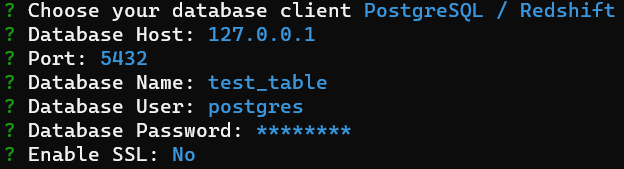
For SQLite users, you don’t need any of these since you’re create any of these.
Next you need to create an admin user as prompted. Then perform the following commands:
cd <insert project name here>
npx directus start
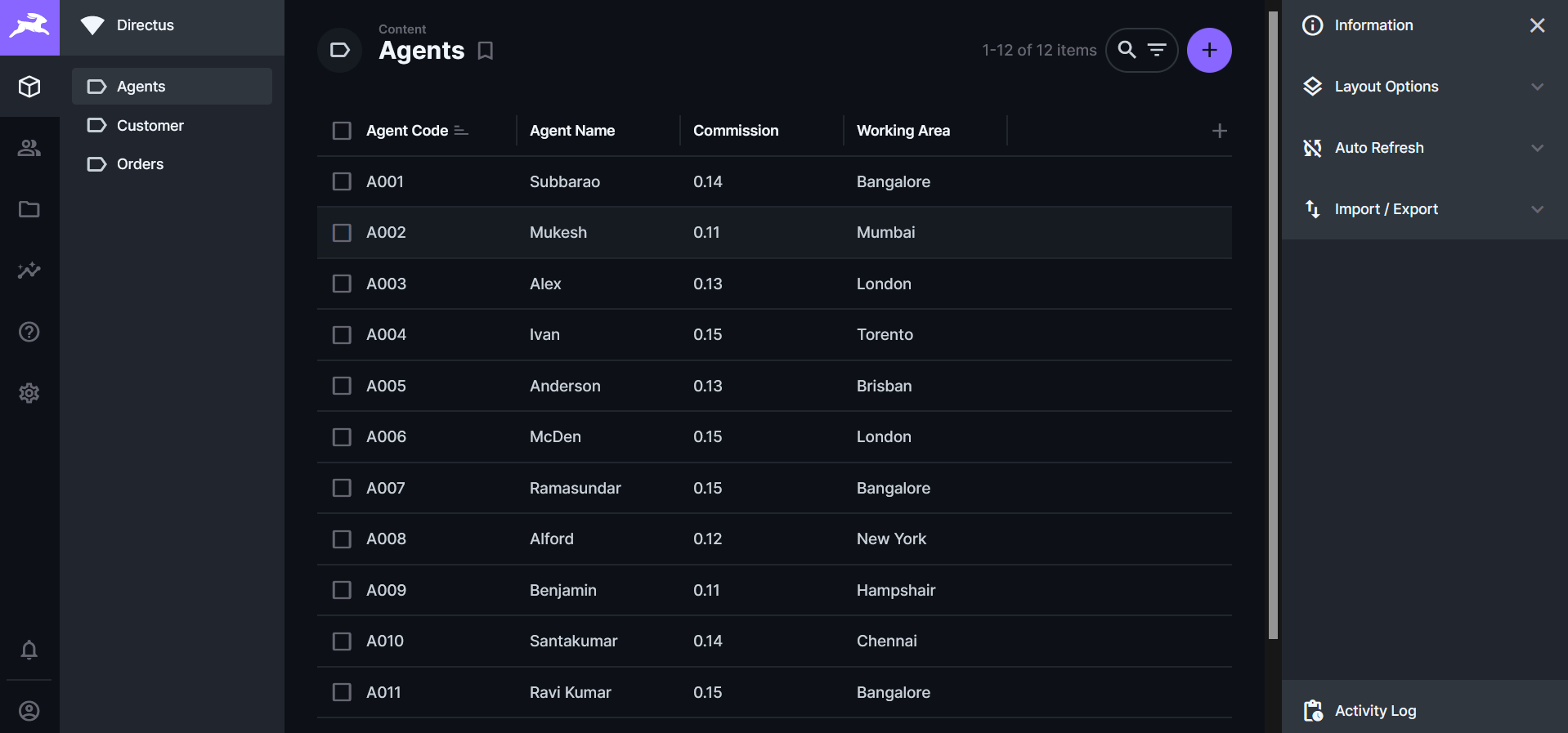
You are then told that the server has started at localhost:8055. Go there and login using the admin user that you just created. You will get something like this:
Conclusion
That is how you do a basic initialization of Directus. Thank you for your patience.
In the next part, we will discuss some of the more advanced features of Directus. Stay tuned.